Start & Completion Date
07/07/2026 -
07/07/2026 -
IN PROGRESS
"Many servers and security tools use Linux. Learn how to use the Linux operating system, a critical skill in cyber security."
Research: What year was the first release of a Linux operating system?
Answer: 1991 (Source)
If we wanted to output the text "TryHackMe", what would our command be?
tryhackme@linux1:~$ echo "TryHackMe"
What is the username of who you're logged in as on your deployed Linux machine?
tryhackme@linux1:~$ whoamitryhackme
On the Linux machine that you deploy, how many folders are there?
tryhackme@linux1:~$ ls access.log folder1 folder2 folder3 folder4
Which folder contains a file?
tryhackme@linux1:~$ ls folder4note.txt
What is the contents of this file?
tryhackme@linux1:~$ cat folder4/note.txtHello World!
Use the cd command to navigate to this file and find out the new current working directory. What is the path?
tryhackme@linux1:~$ cd folder4tryhackme@linux1:~/folder4$ pwd/home/tryhackme/folder4
Use grep on "access.log" to find the flag that has a prefix of "THM". What is the flag? Note: The "access.log" file is located in the "/home/tryhackme/" directory.
tryhackme@linux1:~$ grep 'THM' access.log13.127.130.212 - - [04/May/2021:08:35:26 +0000] "GET THM{ACCESS} lang=en HTTP/1.1" 404 360 "-" "Mozilla/5.0 (Windows NT 10.0; Win64; x64) AppleWebKit/537.36 (KHTML, like Gecko) Chrome/77.0.3865.120 Safari/537.36"If we wanted to run a command in the background, what operator would we want to use?
Answer: &
If I wanted to replace the contents of a file named "passwords" with the word "password123", what would my command be?
tryhackme@linux1:~$ echo password123 > passwords tryhackme@linux1:~$ cat passwordspassword123
Now if I wanted to add "tryhackme" to this file named "passwords" but also keep "passwords123", what would my command be?
tryhackme@linux1:~$ echo tryhackme >> passwords tryhackme@linux1:~$ cat passwordspassword123tryhackme
What directional arrow key would we use to navigate down the manual page?
Answer: Down
What flag would we use to display the output in a "human-readable" way?
Answer:-h
How would you create the file named "newnote"?
tryhackme@linux2:~$ touch newnote
On the deployable machine, what is the file type of "unknown1" in "tryhackme's" home directory?
tryhackme@linux2:~$ file unknown1unknown1: ASCII text
How would we move the file "myfile" to the directory "myfolder"
tryhackme@linux2:~$ mv myfile myfolder
What are the contents of this file?
tryhackme@linux2:~$ cat myfolder/myfileTHM{FILESYSTEM}
On the deployable machine, who is the owner of "important"?
tryhackme@linux2:~$ ls -l important-rw-r--r-- 1 user2 user2 14 May 5 2021 important
What would the command be to switch to the user "user2"?
tryhackme@linux2:~$ su user2
Output the contents of "important", what is the flag?
tryhackme@linux2:~$ cat importantTHM{SU_USER2}
What is the directory path that would we expect logs to be stored in?
Answer: /var/log
What root directory is similar to how RAM on a computer works?
Answer: /tmp
Name the home directory of the root user
Answer: /root
Create a file using Nano
tryhackme@linux3:~$ nano newfile
Edit "task3" located in "tryhackme"'s home directory using Nano. What is the flag?
tryhackme@linux3:~$ cat task3THM{TEXT_EDITORS}
Now, use Python 3's HTTPServer module to start a web server in the home directory of the "tryhackme" user on the deployed instance.
tryhackme@linux3:~$ python3 -m http.serverServing HTTP on 0.0.0.0 port 8000 (http://0.0.0.0:8000/) ...
Download the file http://10.81.183.46:8000/.flag.txt onto the TryHackMe AttackBox. What are the contents?
┌──[e0in@parrot]─[~]└──╼ $wget http://10.81.177.180:8000/.flag.txt--2026-07-24 12:20:23-- http://10.81.177.180:8000/.flag.txtConnecting to 10.81.177.180:8000... connected.HTTP request sent, awaiting response... 200 OKLength: 20 [text/plain]Saving to: ‘.flag.txt’.flag.txt 100%[=========================================>] 20 --.-KB/s in 0s2026-07-24 12:20:23 (1.01 MB/s) - ‘.flag.txt’ saved [20/20]┌──[e0in@parrot]─[~]└──╼ $cat .flag.txtTHM{WGET_WEBSERVER}
If we were to launch a process where the previous ID was "300", what would the ID of this new process be?
Answer: 301
If we wanted to cleanly kill a process, what signal would we send it?
Answer: SIGTERM
What command would we use to start the same service on boot-up of the system?
tryhackme@linux3:~$ systemctl enable [SERVICE_NAME]
What command would we use to bring a previously backgrounded process back to the foreground?
Answer: fg
When will the crontab on the deployed instance run?
tryhackme@linux3:~$ crontab -l

						# Edit this file to introduce tasks to be run by cron.

						#

						# Each task to run has to be defined through a single line

						# indicating with different fields when the task will be run

						# and what command to run for the task

						#

						# To define the time you can provide concrete values for

						# minute (m), hour (h), day of month (dom), month (mon),

						# and day of week (dow) or use '*' in these fields (for 'any').

						#

						# Notice that tasks will be started based on the cron's system

						# daemon's notion of time and timezones.

						#

						# Output of the crontab jobs (including errors) is sent through

						# email to the user the crontab file belongs to (unless redirected).

						#

						# For example, you can run a backup of all your user accounts

						# at 5 a.m every week with:

						# 0 5 * * 1 tar -zcf /var/backups/home.tgz /home/

						#

						# For more information see the manual pages of crontab(5) and cron(8)

						#

						# m h  dom mon dow   command

						@reboot /var/opt/processes.sh
Answer: On reboot.
What is the IP address of the user who visited the site?
tryhackme@linux3:/var/log/apache2$ cat access.log.110.9.232.111 - - [04/May/2021:18:18:16 +0000] "GET /catsanddogs.jpg HTTP/1.1" 200 51395 "-" "Mozilla/5.0 ..."
What file did they access?
tryhackme@linux3:/var/log/apache2$ cat access.log.110.9.232.111 - - [04/May/2021:18:18:16 +0000] "GET /catsanddogs.jpg HTTP/1.1" 200 51395 "-" "Mozilla/5.0 ..."
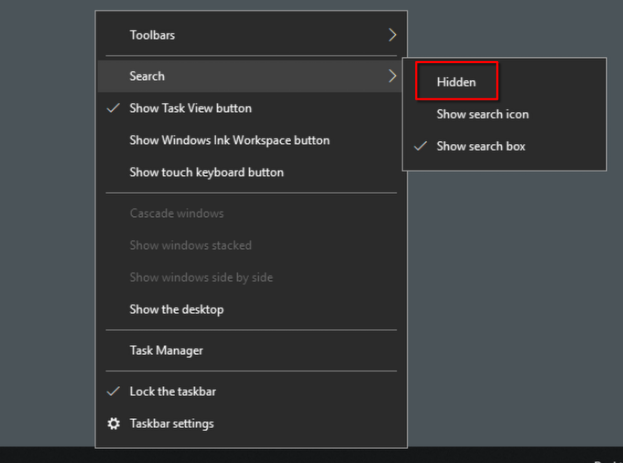
Which selection will hide/disable the Search box?
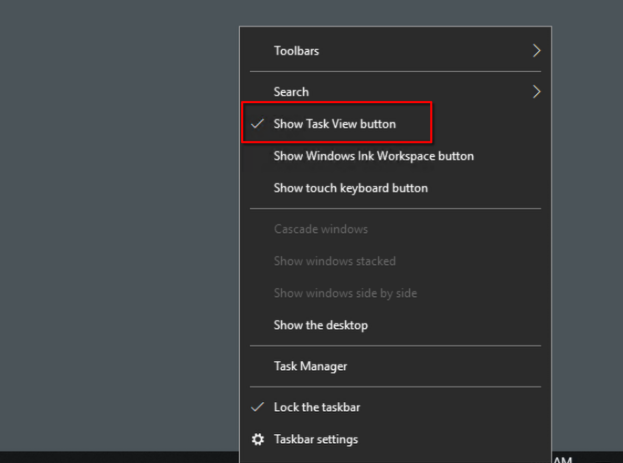
What selection will hide/disable the Task View button?
Besides Clock and Network, what other icon is visible in the Notification Area?
Action Center
What is the meaning of NTFS?
New Technology File System.
What is the system variable for the Windows folder?
%windir%
What is the name of the other user account?
tryhackmebilly
What groups does the other user belong to?
Users, Remote Desktop Users
What built-in account is for guest access to the computer?
Guest
What is the account description
window$Fun1
What does UAC stand for?
User Account Control
In the Control Panel, change the view to Small icons. What is the last setting in the Control Panel view?
Windows Defender Firewall
What is the keyboard shortcut to open Task Manager?
Ctrl + Shift + Esc